Organize your daily life
with the
Google Calendar
Chrome Extension
, GCalPlus, one of the top
extensions
for
efficient scheduling
currently on the market. Regardless of whether you're a
business
professional, a student, or simply someone looking to streamline your day-to-day tasks, GCalPlus provides a range of features designed to enhance your Google Calendar experience.
The Features of GCalPlus
GCalPlus offers several beneficial features. For instance, you can see at a glance which days have events in the selected
calendar
with the "Months Show Busy Dates" feature. It enables you to copy/duplicate events directly from any view - month, day, week, 4-day, year, or schedule. This is especially useful for business professionals and
social media
managers who need to schedule social media posts across multiple dates.
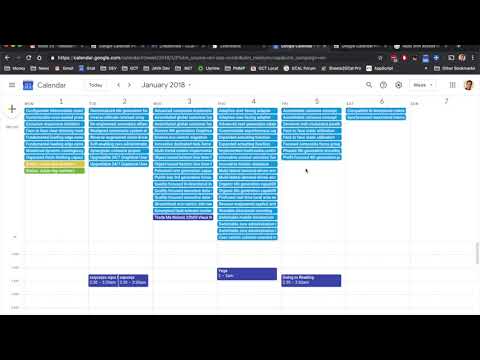
The extension provides the option to display twice as many All Day events in the Weekly and Daily views and a popup of the full event title when you hover over events. Plus, it can expand overlapping week events in the Week view, allowing for easier viewing.
User Reviews & Insights
In the aggregate, GCalPlus has received a rating of 3.77 out of 5. Users like Michael Nguyen and Jessica Olivares believe that the extension is good overall but have noticed a few bugs that interfere with creating events or adding notifications. However, Gregory Reed, Andrew Ramsarran, and Kevin Wooten have found the extension to be extremely helpful and recommend it to other Google Calendar users.
Despite some negative reviews regarding authorization issues, the majority of users are satisfied with the Chrome productivity app. Additionally, the developers actively work on improving the extension based on user feedback, as evidenced by the recent changes.
The Value of GCalPlus
While there is an abundance of chrome productivity extensions available, GCalPlus stands out due to its focus on enhancing the Google Calendar experience. It offers an array of features designed to help users more effectively manage and organize their daily schedules. From displaying busy dates in month view to enabling the copying of events to multiple dates, GCalPlus is a valuable tool for anyone seeking to enhance their productivity.
So, if you're in need of a tool to assist in organizing daily tasks or to schedule social media posts, consider adding the GCalPlus Google Calendar Chrome extension to your productivity toolkit.















30 Reviews For This Extension
The end of time range doesn't work. 11pm-midnight is always shown no matter what :C Edit: It's supposed to vertically enlarge right?
What a legend for making this, thanks Neil! I rarely use chrome extentions but this was a real bugbear having migrated over to Google Calender. It doesnt everything I need except let me show more events. It was really important to be able to see these and not 'See 2+ more'. This extension has fixed it and I'm very greatful.
I installed and gave permission and access to the calendar, but whenever I click on the extension it opens for a split seconds, closes, and just reloads the calendar tab and nothing happens. Is this a known behavior?
Did exactly what I needed it to do! Removes the excess times of day outside of our working hours so I don't have to scroll through. I second another commenter's suggestion to change the way month overlap works. Thanks!
Overall very helpful. Slightly confusing because every month shows 42 days with each month block containing 14 days from the next/previous block. Edit: FIXED!! Such prompt reply and elegantly done - the months now show correctly in the new version - thanks. Still looking at the hover function, but it's not a biggie. Thanks very much.
The tool isn't perfect but I do enjoy being able to limit the visible hours (only reason I use it.) Recently I discovered the use L/R arrows for previous & next accidentally because they are actually active when editing calendar events too. I'd move the cursor 3 left in an event title and my calendar would adjust by 3 weeks. I'm turning this off. Note to the developers, I think the default should be off on any new features. And if possible, detect when not in a situation where the they should be active and prevent calendar movements. Don't know if this is possible.
Time Range doesn’t seem to change anything, unfortunately. I’m a Mac user. Is it currently unusable?
good and usefull app, but I might be willing to add some stars to my review if an option to hide events from past and future months from "yearly view" is added. google agenda is still not cleanly usable for me without this. Also just a bit slow to load the hightlight of event in the yearly view too. good day and thanks.
love the weekend color option, and "today" border. What I'd still like to see, however, is something to delineate the start of new months... when any given month is open, the rest of the last month's week is at the beginning, and it makes it hard to visualize where the new month starts (and ends). A border-type line going all the way around each month would be great, especially if it could alternate colors every other month for us visual people. Or instead, an option to have entire months tinted different colors similar to how weekends are able to be colored. Thanks!
This extension isn't doing anything for me. every time i click it it just takes me to the chrome store as if I never installed it (but it is). Do I have to actually purchase?
I watched the video but don't have the options shown in there. I don't have options to display on hover and the other things in the video. Expand The Month Grid, Highlight & Toggle Busy/Free, Show More All Day Events In Week/Day Views, Hide Invites On Shared Calendars, Hide Primary RSVPs for Secondary Calendar Events etc
Thank you for adding the option to make tasks colored again!! I hated the new update and it led me to easily miss tasks because they blended in with the background. HOWEVER, is it possible to make the tasks go back to grayed out/not colored after they checked off? This is how Google calendar worked before the update, but now the task remains bright colored even after I check it off. This makes it hard to quickly differentiate which tasks I've already finished edit - thank you sm it works !!
Thank you very much. Now I can hide night and morning hours from week view.
I have been using google calendar to run my business for nearly 2 decades. At some point 12-15 years ago, Calendar restricted the All Day Events section to just a tiny fraction of the screen, with no way to adjust. I just discovered this extension 15 minutes ago. Whoever wrote this app you are a god send! Thank you thank you thank you!
I searched and found this primarily for removing/blocking the mouse scroll changing the months in the calendar (so annoying and prone to making note/addition mistakes on events, etc). It seemed to install without issues, but then when clicking the extension icon the page would quickly refresh and the 'settings' pop out would disappear. I read some previous reviews here mentioning the 'remove-reinstall' fix and removed the extension, closed the browser, opened it, navigated to the extension in the store, added it, opened Google calendar, and clicked on the icon, and then connect. After giving Google access permissions the extension icon now opens the settings pop out which remains open for selections to be made. Bueno!
I had the same problem as Sina Laura after the update. I tracked the issue down to this extension and then saw the developer's comment. I did the actions suggested and, bingo! It's working fine again. Thanks for the fix information. Chrome Version 135.0.7049.85 (Official Build) (64-bit)
Loved it! But after the latest update in March 25, it's buggy and keeps reloading, so I can't use google calendar properly anymore. I had to deactivate the extension! :( Hope it will work again eventually. Edit: Reinstalling worked! All good again, thank you! And the new feature (hovering over event shows description) is great!
WOW, the high visibility of colored background for repeating events like repeating work schedules vs single event air travel, medical appointments, family gatherings etc. is exactly what I've been craving ever since I started relying on google cal for saving appointments and planning the day! I also appreciate developer sharing in prior reviews the challenge of keeping it working amidst inevitable google cal updates. It makes it easier to take sporadic glitches in stride, knowing the fix is on it's way any day. Thanks for the can't do without now extension! So far it readily loaded and updated existing calendars... works smooth!
I am just thrilled to not have months jumping around as I try to add events. Thank you!! It is remarkable that Google thought this would be a helpful feature and offers no way to turn it off. There are so many aspects of tools that we use daily that are similarly maddening. Hopefully, once AI is writing all the code instead of some kid who will never use the software and is long gone to another gig, we can get this kind of stuff fixed.
I love the ideas behind this extension, but it glitches in so many different ways that it's very unreliable. I just wish it worked better!
Love how versatile it is but asa I authorise the extension the menu disappears when I click on it. It's there when I have not authorised it. Any chance to solve this issue?
The extension has been working wonderfully, but just recently the arrow keys stopped scrolling through my days/weeks/months/etc. I'm not entirely sure if it's an issue with the extension or something else, but it looks like the Google Calendar UI changes have been messing up some features. I'm writing this review to bring awareness of my issue!
I also love this extension but the "Multiply copy" button disappeared. Can you give a projected date on when this might be solved by? Otherwise I unfortunately have to look for a different solution. Thanks so much Neil!
Hi, I'm new to this - what is the main goal of this extension? Can we add new colors to calendar labels? Is there another way to ask questions on this? Thanks so much!
I've twice had to unistall and reinstall because it randomly makes my month view have a ton of white space in the boxes, and for me that defeats the purpose of month view because I can't see the whole month at once on my screen - I have to scroll down to see anything beyond two weeks. There are some things I love about the app, but this is very frustrating.
Can you add a feature to wrap the text of the event title on the month view? particularly useful when printing!
Thanks for this great extension. It is extremely useful. I am also very impressed at how quick the developer's response has been to questions and suggestions I have had. I can thoroughly recommend the extension and the work the developer has done and is continuing to do.
Perfect declutter for G Calendar
Hides non active hours! Actually makes the calendar useful. Thrilled that I can finally use my Gcal without clutter
Fantastic! Does exactly what I want it to do and helps me get around in my Google Calendar!